CRM for Manufacturers: Equipping Your Independent Sales Agent Network
You sell your products through a network of independent multi-line sales agents and you are looking for the CRM for manufacturers and sales agents that will finally give you real visibility over your indirect sales force. According to the Fédération Nationale des Agents Commerciaux (FNAC), sales agents generate more than €70 billion in orders per year for their principals in France — a powerful distribution channel, but one that requires the right tools to manage effectively.
Updated September 2026 — by the KepleR team, French publisher of CRM software for multi-line sales agents.
The difficulty is well known to every sales director who relies on this model: the agent is independent, with no subordination relationship. You cannot impose a software tool on them as you would with an employee. The right software for a sales agent network is therefore the one your agents adopt willingly — because it genuinely helps them in the field every day — whilst feeding back the data you need to manage your network. That precise balance is what KepleR was designed to achieve.

KepleR is a software for multi-line sales agents that manufacturers can offer to their entire agent network.
Why equipping your sales agents with a CRM has become essential
For a long time, manufacturers made do with monthly sales figures sent over by their agents, with no visibility into what was actually happening at the point of sale between reports. Those days are over. Competition has intensified, grocery and specialist retail buyers are better prepared, and your agents are calling on dozens of product ranges — yours, but also your competitors'.
Equipping your sales agents with a CRM is not an IT project: it is a strategic decision. It allows you to:
- Know in real time whether your ranges are on shelf and where out-of-stocks have been spotted.
- Monitor the frequency and quality of customer visits without having to chase each agent individually.
- Centralise visit reports, live opportunities and long sales-cycle files.
- Make network management decisions based on reliable data, not gut feeling.
The goal is not to control your agents — that would be legally and humanly counterproductive — but to create a shared information flow that benefits both parties: the agent gains in organisation, you gain in visibility.
The key constraint: the independence of the sales agent
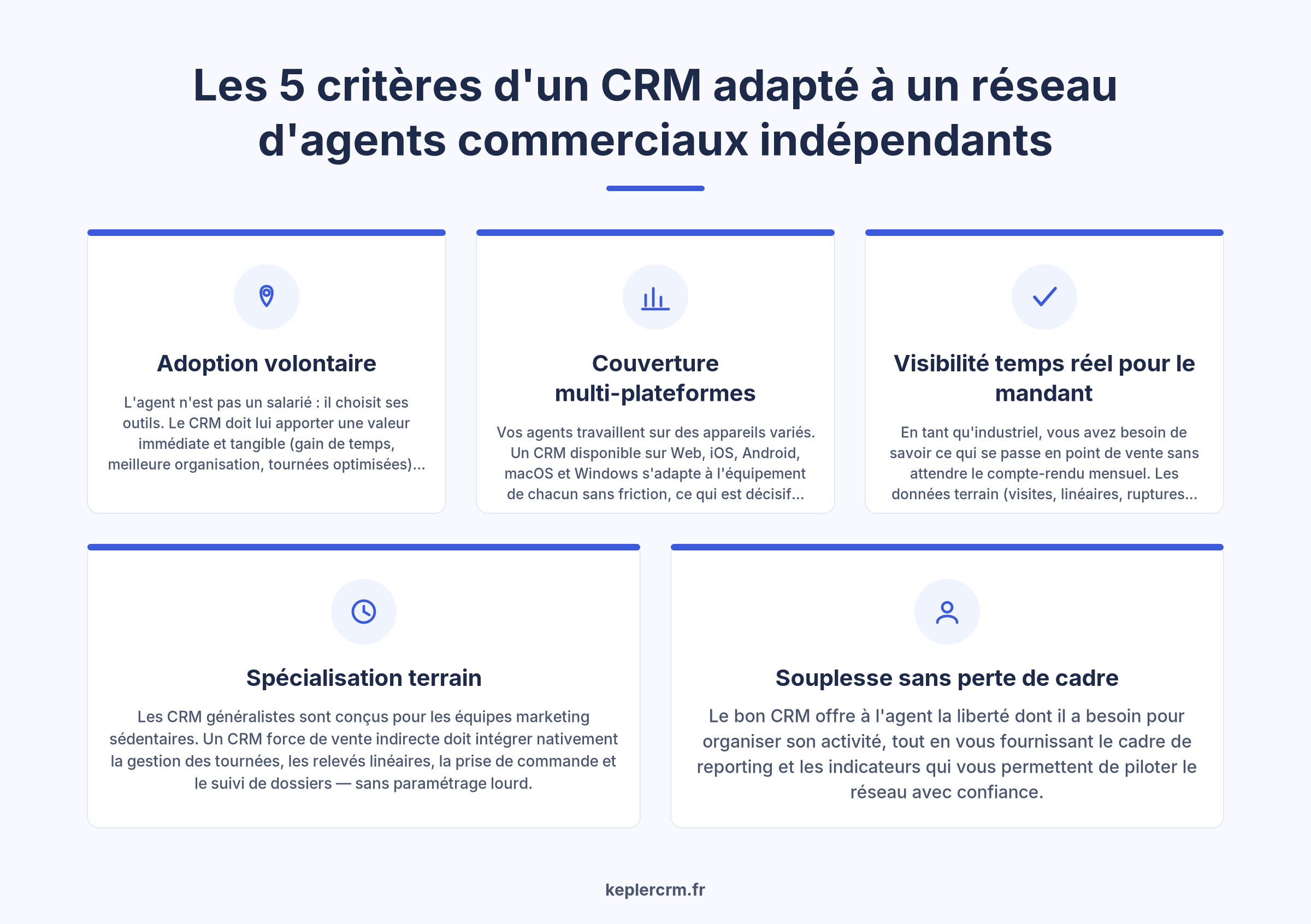
Every experienced sales director knows it: a sales agent is not an employee. The French Commercial Code (Art. L. 134-1) recognises them as an independent agent, negotiating and concluding contracts on behalf of their principals without any subordination relationship. This independence is a strength — it spares you significant employment costs and gives you immediate field coverage — but it imposes a golden rule when choosing a CRM: the tool must be useful to the agent before it is useful to you.
A CRM perceived as a mere surveillance tool will be rejected, or worse, fed with minimal data of no real value. Conversely, a CRM that optimises the agent's call plan, saves them time on data entry and helps them present your ranges more effectively in meetings will quickly become their daily companion in the field. That is the sine qua non for you to receive actionable field intelligence in return.
This virtuous circle — the tool is adopted because it is useful to the agent, and it is useful to the principal because it is adopted — is the number-one criterion to evaluate before choosing a software for a sales agent network. You may also wish to consult our comparison of multi-line sales agent software to assess the options available on the market.
Generic CRM vs specialist field CRM: what changes for your agent network
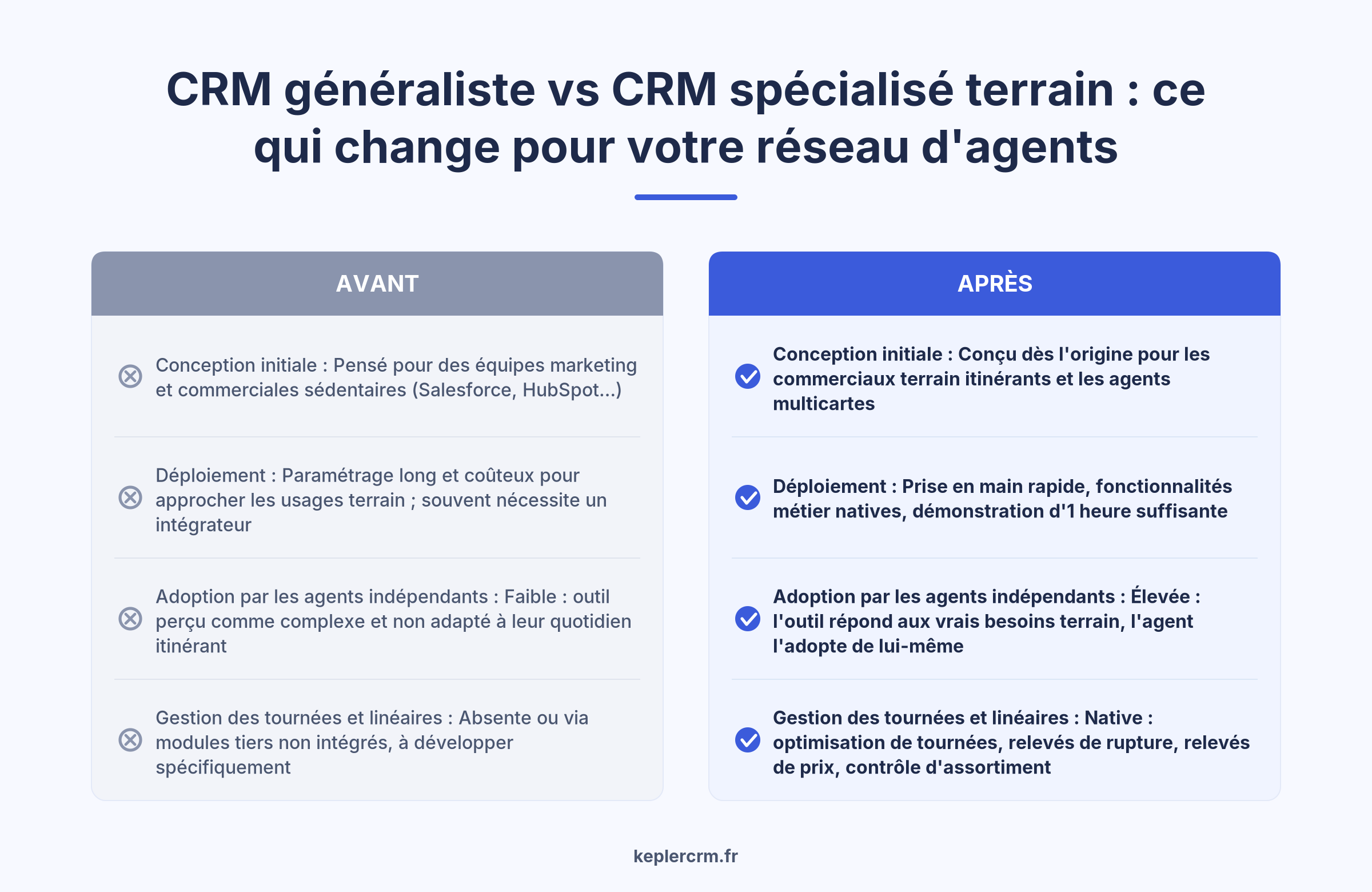
| Criterion | Generic CRM | Specialist field CRM (KepleR) |
|---|---|---|
| Original design | Built for sedentary marketing and sales teams (Salesforce, HubSpot…) | Designed from the outset for field sales reps on the road and multi-line agents |
| Deployment | Lengthy and costly configuration to approach field use cases; often requires an integrator | Quick to get started, native trade features, one-hour demonstration sufficient |
| Adoption by independent agents | Low: tool perceived as complex and unsuited to their itinerant daily reality | High: the tool addresses real field needs, the agent adopts it on their own initiative |
| Route planning and shelf management | Absent or via non-integrated third-party modules requiring specific development | Native: route optimisation, out-of-stock audits, price checks, assortment control |
| Principal real-time visibility | Possible but requires significant CRM development on the field reporting side | Built in: principal dashboards fed automatically by the agent's field entries |
What a CRM for a manufacturer's indirect sales force must cover
Not all CRMs are equal when it comes to the specificities of a multi-line sales agent network working for a manufacturer. Here are the features that truly make the difference:
Route planning and optimisation
Your agents may cover several counties or regions. A native route planning module — which optimises itineraries and ensures every customer is visited at the right frequency — reduces kilometres driven and increases the number of productive calls. KepleR integrates this optimisation directly into the tool, with no third-party module to configure.
Shelf audits and assortment control
For a manufacturer whose products are distributed through grocery retail, DIY retail or specialist retail chains, the shelf is a key asset. KepleR offers a complete module: out-of-stock audits, price checks, assortment control. Your agents collect this data at the point of sale; you analyse it from your principal dashboard.
Order taking and file management
KepleR handles both rapid order taking with EAN barcode scanning and the management of long sales-cycle files — essential if you operate in sectors where the purchasing decision takes several weeks or months (construction, industry, fit-out…).
All-platform accessibility
Your agents are not all equipped with the same devices. KepleR works on Web, iPhone (iOS), iPad (iPadOS), Android, Mac (macOS) and Windows, fully online, ensuring every agent can use the tool on their usual device without any friction at adoption.
CRM for manufacturers: which sectors, which specificities?
The strength of a indirect sales force CRM suited to industry lies in its ability to adapt to the realities of each sector whilst remaining the same tool for your entire network. KepleR covers all industrial and manufacturing sectors — with the exception of real estate — with configurations tailored to the sales cycles, customer types and reporting requirements specific to each market.
A few examples of sectors where our manufacturing clients deploy KepleR with their agents:
- Cosmetics and pharmaceuticals: specific requirements for traceability, listing management and key account tracking. Discover the CRM for cosmetics and pharmaceutical laboratories.
- Construction, DIY and building materials: long sales cycles, multiple specifiers (architects, project managers, merchant networks) and strong seasonality. See the CRM for manufacturers in construction, DIY and building.
- Decoration and garden: a collection and seasonality logic, plus central listing requirements that demand rigorous assortment tracking. Discover the CRM for decoration and garden manufacturers.
Whatever your sector, the one-hour demonstration offered by KepleR allows you to validate in concrete terms how well the tool fits your product ranges, your distribution channel and the size of your agent network.
How to deploy a CRM with your independent sales agents
Deploying a CRM across a network of independent agents does not happen by chance. Here are the steps that make the difference between a project that takes hold and a tool that gathers dust:
1. Involve agents from the outset
Present the tool to two or three of your most active agents before making any decision. Their field feedback is more valuable than any feature checklist. An agent who has been part of the selection process naturally becomes an ambassador to their peers.
2. Show the value to the agent first
When onboarding, start with the features that simplify the agent's working life: route optimisation, a complete customer record at a glance, voice-dictated visit reports. Only once adoption is secured do the data feeds back to the principal become reliable.
3. Set clear, lightweight reporting rules
Agree with your agents on a minimal reporting framework: what information is expected after each visit, and how often. A well-configured CRM makes this data entry almost automatic — it flows naturally from the visit itself, rather than adding to the workload afterwards.
4. Measure and adjust
The first months of deployment are invaluable: analyse usage rates, identify agents who are not using the CRM and understand why. It is usually a matter of onboarding, not reluctance. KepleR offers a one-hour demonstration to support this launch phase.
Discover KepleR on video

Frequently asked questions
Can you require independent sales agents to use a CRM?
No — legally, an independent sales agent is not subject to the principal's power of direction. You cannot impose a tool on them as you would with an employee. The right approach is to choose a CRM that your agents adopt willingly because it is genuinely useful to them day to day — route optimisation, complete customer records, quick data entry — and which, in return, feeds back the field data you need. Buy-in is built, not mandated.
What is the difference between equipping employed sales reps and independent agents with a CRM?
With employees, you can make CRM use compulsory and embed it in the company's internal processes. With independent agents, the logic is reversed: the CRM must first prove its value to the agent in order to be adopted. This means choosing a tool that is simple, mobile, field-ready and that creates no extra administrative burden. A well-chosen CRM also becomes an argument for attracting and retaining your best agents.
How can a CRM improve a manufacturer's visibility over their sales agent network?
A specialist field CRM allows your agents to enter their visit reports, shelf data and orders directly from the point of sale. This information flows in real time into your principal dashboard: visit frequency by customer, shelf presence rate for your ranges, out-of-stocks flagged, live files in progress. You move from an approximate monthly report to a continuous, reliable view of your field commercial activity.
Is KepleR suited to all industrial sectors?
KepleR covers all industrial and manufacturing sectors — from cosmetics and pharmaceuticals to construction, as well as decoration, garden, food, industrial equipment and many others. The only exception is real estate. Whatever your sector, a one-hour demonstration will allow you to validate in concrete terms how well the tool fits your product ranges and your distribution channel.
How do you evaluate the right CRM for your agent network before committing?
The best approach is to test the tool with two or three of your field agents before any rollout. KepleR offers a free trial and a one-hour demonstration led by a specialist. This session allows the tool to be configured to your product ranges and your network, and provides a genuine first field opinion — the condition for making an informed decision without risk.
Equipping your agents: let's talk
Every agent network is different. The simplest thing is to discuss your organisation, your sectors and your product ranges: we will show you concretely, during a demonstration, how KepleR adapts to your network — and we will put together a quote based on your number of agents.