Manage your orders, credit notes and quotes across all principals from your phone
Scan product barcodes or enter manufacturer references. Your principal's terms are applied automatically, and the formatted document is sent in one click. Sales agents using KepleR cut their administrative workload in half.
Order taking as simple as taking a photo
Import your principals' Excel price lists into KepleR. You then simply scan product barcodes with your phone or tablet camera to take orders, raise credit note requests, or create quotes. The product sheet opens with the principal's pricing, pack size, and sales history for that outlet. If you prefer, we can import the price list for you.
Your commercial documents generated automatically
Import your sales agency's logo and address: every quote, order, and credit note is personalised automatically. Each line includes the barcode, reference, description, quantity, unit price, cumulative discount, and total. The document is ready to send to the principal, with a copy to the client.
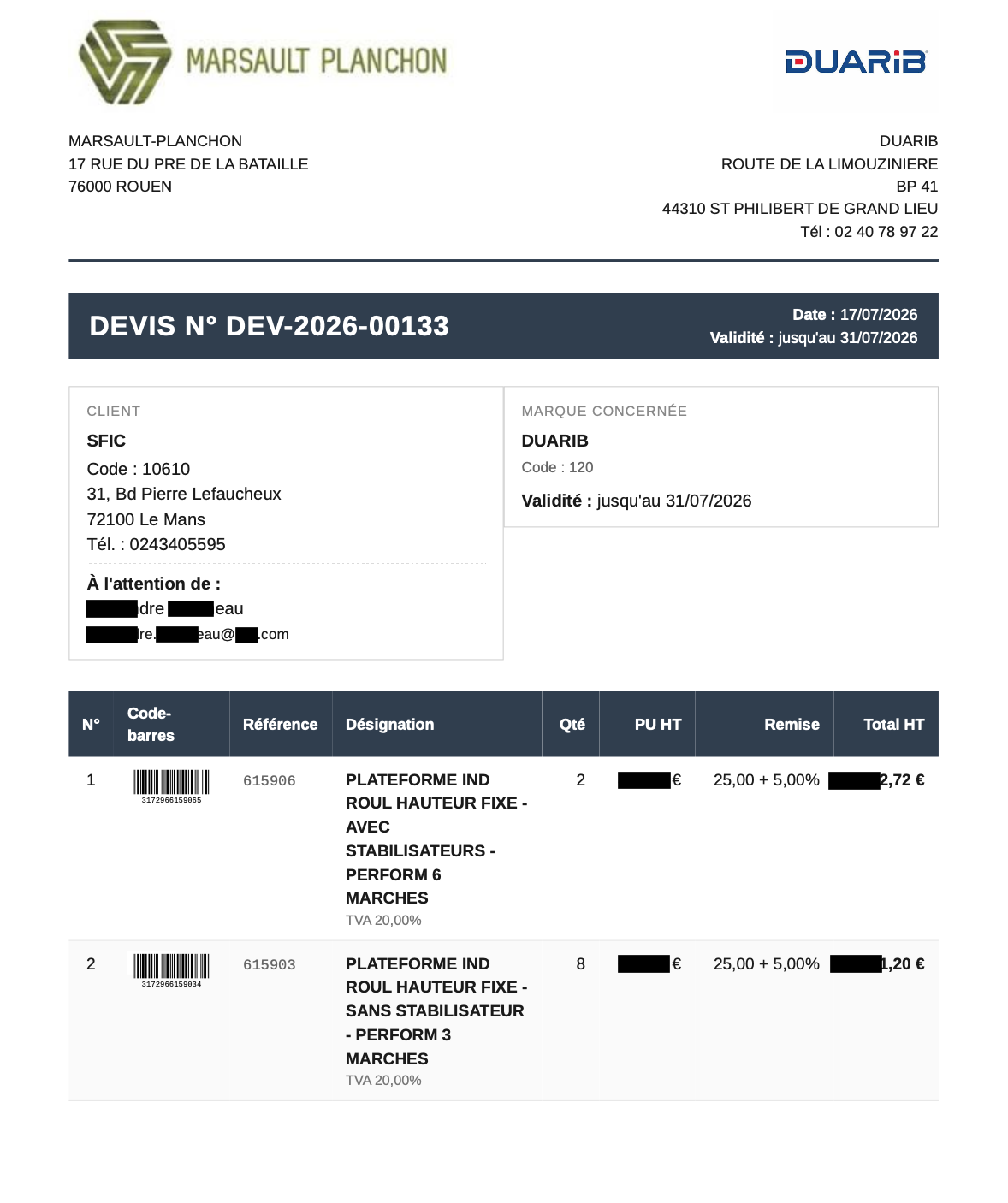
Track quotes and pro-formas in real time, and follow them up
Choose the date on which you want to follow up a quote. Each day, KepleR notifies you of quotes and pro-formas due for follow-up, and adds them to your call plan if the client is on your route. A validated quote converts into an order on the spot, with nothing to re-enter.

Principal and retail banner terms applied without mental arithmetic
The same reference, but different prices and agreements depending on the buying group, the retail banner, or sometimes the individual store. KepleR distinguishes central listing conditions, per-banner terms, and locally negotiated discounts, then applies the correct pricing grid at the point of order. You sell at the right price without having to juggle three different price lists.
Ideal software for agents. Easy to use. Very available and responsive.
Frequently asked questions about orders and quotes
Do I need a dedicated barcode scanner?
No. KepleR uses your phone or tablet camera — on Android, iOS, and iPadOS — to read EAN barcodes. You can also type in the manufacturer reference or search for the product by name.
How do my price lists get into KepleR?
You can import your principals' Excel price lists yourself, or hand them over to us: we integrate each file for €80 excl. VAT. Price list updates work the same way, without affecting your order history.
Can a quote become an order?
Yes. A quote approved by the client converts directly into an order during the meeting, with no re-entry required. The order is sent to the relevant principal with the correct pricing grid and, if you wish, a copy to the client.
Can I manage returns and credit notes?
Yes. Credit note requests and returns follow the same process as orders: scan the product, enter quantities, add a reason, send to the principal. They are linked to the client record and the principal for commission tracking.
Place your first KepleR order during the demo
We import one of your price lists before your complimentary one-hour video call. You scan, the order goes out. See it for yourself.