Choosing accounting software for an independent sales rep is not simply a matter of comparing prices: it is above all about how data flows between your field activity and your tax obligations. In 2026, multi-line independent sales reps are juggling several principals, variable commission rates, and the phased introduction of mandatory electronic invoicing. All the more reason to structure your toolset quickly, starting with a clear link between your CRM and your accounting software.
The situation today: accounting, the blind spot for many independent sales reps
An independent sales rep registered with the RSAC (Registre Spécial des Agents Commerciaux) operates as a self-employed professional and invoices commissions to their principals. According to the online firm L-Expert-Comptable.com (2026), accounting management quickly becomes time-consuming as the business grows, especially when managing multiple principals and commission lines.
Several realities stand out:
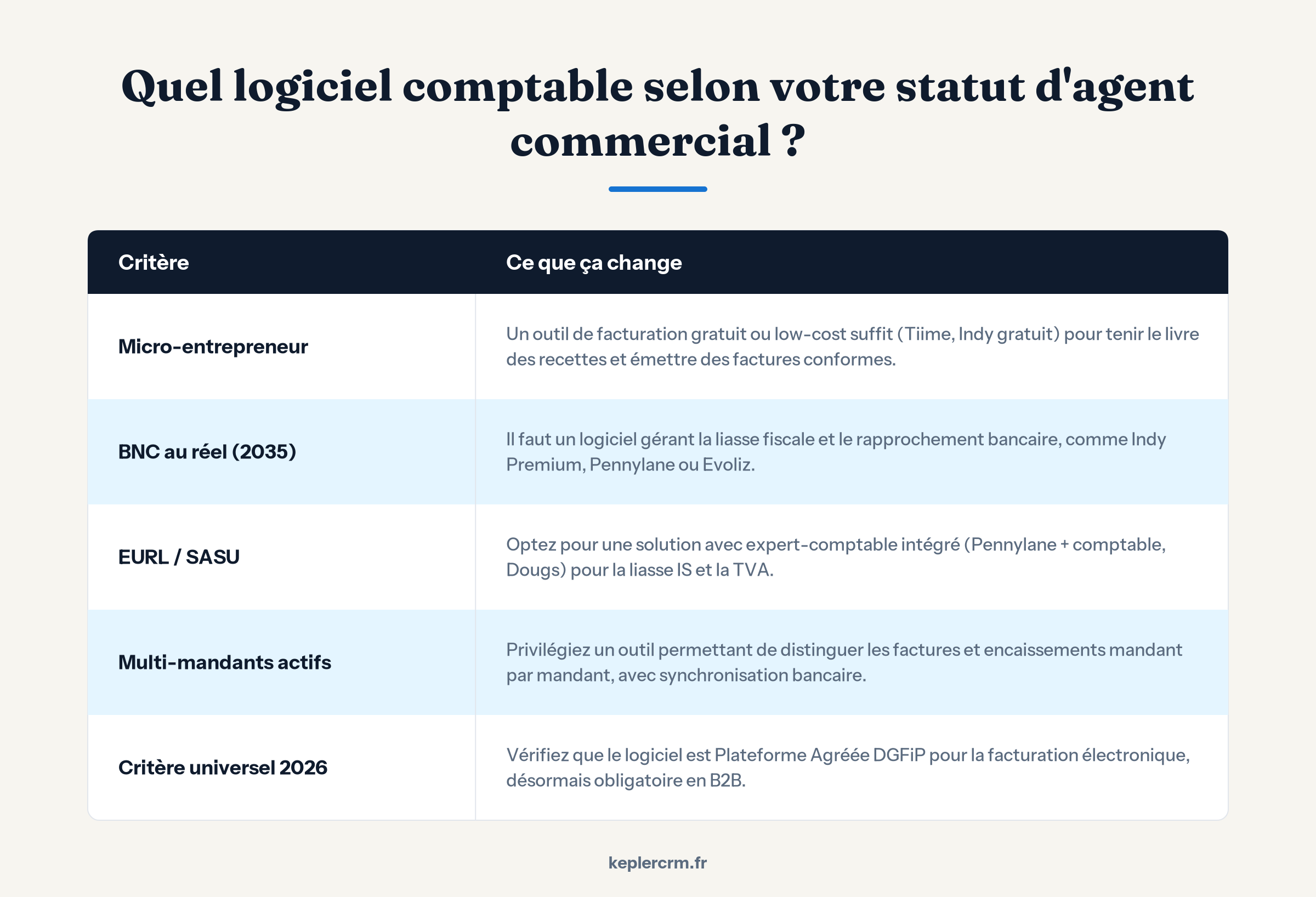
- A rep operating as a sole trader under the micro-enterprise regime must keep a receipts ledger and issue compliant invoices, without necessarily needing double-entry bookkeeping.
- A rep operating under the actual income regime (BNC, 2035 return) or through a limited company must produce a full tax return, which requires a more robust tool.
- Since 2024, the DGFiP-accredited platform for electronic invoicing has become essential for B2B transactions — a selection criterion that is now non-negotiable.
- Double entry — re-keying into the accounting system data that already exists in the CRM — remains the leading source of wasted time and reconciliation errors.
The solutions available in 2026 fall into two broad categories: standalone software (Indy, Tiime, Pennylane, Evoliz…) and packages with a dedicated accountant (Pennylane + accountant, Dougs, L-Expert-Comptable.com). Prices observed range from €0 for freemium versions to €99/month for packages with integrated accounting support (source: danstapoche.fr comparison, 2026).
The specific challenges for the multi-line sales rep
The accounting needs of a multi-line sales rep differ from those of a typical freelancer. There are specific constraints that a general-purpose tool does not always handle natively.
Invoicing principal by principal
Each commission must be invoiced separately to each principal, with the correct VAT rate and the correct contract reference. Software that does not distinguish supplier contacts from customer contacts needlessly complicates this tracking. Tiime, for example, offers unlimited free invoicing, which is handy for issuing a separate invoice per principal (L-Expert-Comptable.com, 2026).
Tracking payments and outstanding amounts
Sales reps often work on 30-, 60-, or 90-day terms. Knowing whether a commission has actually been paid — and matching it to an invoice issued — is a repetitive task. Software that syncs the business bank account automates this matching and reduces oversights.
Preparing tax returns without errors
Under the actual income regime (BNC 2035), the rep must distinguish sales route expenses, meals, software subscriptions, and commissions received. A tool that automatically categorises bank transactions — such as Indy, which "automatically syncs bank accounts and generates tax returns" (indy.fr, 2026) — reduces this risk of error.
How to connect your accounting software to your field CRM
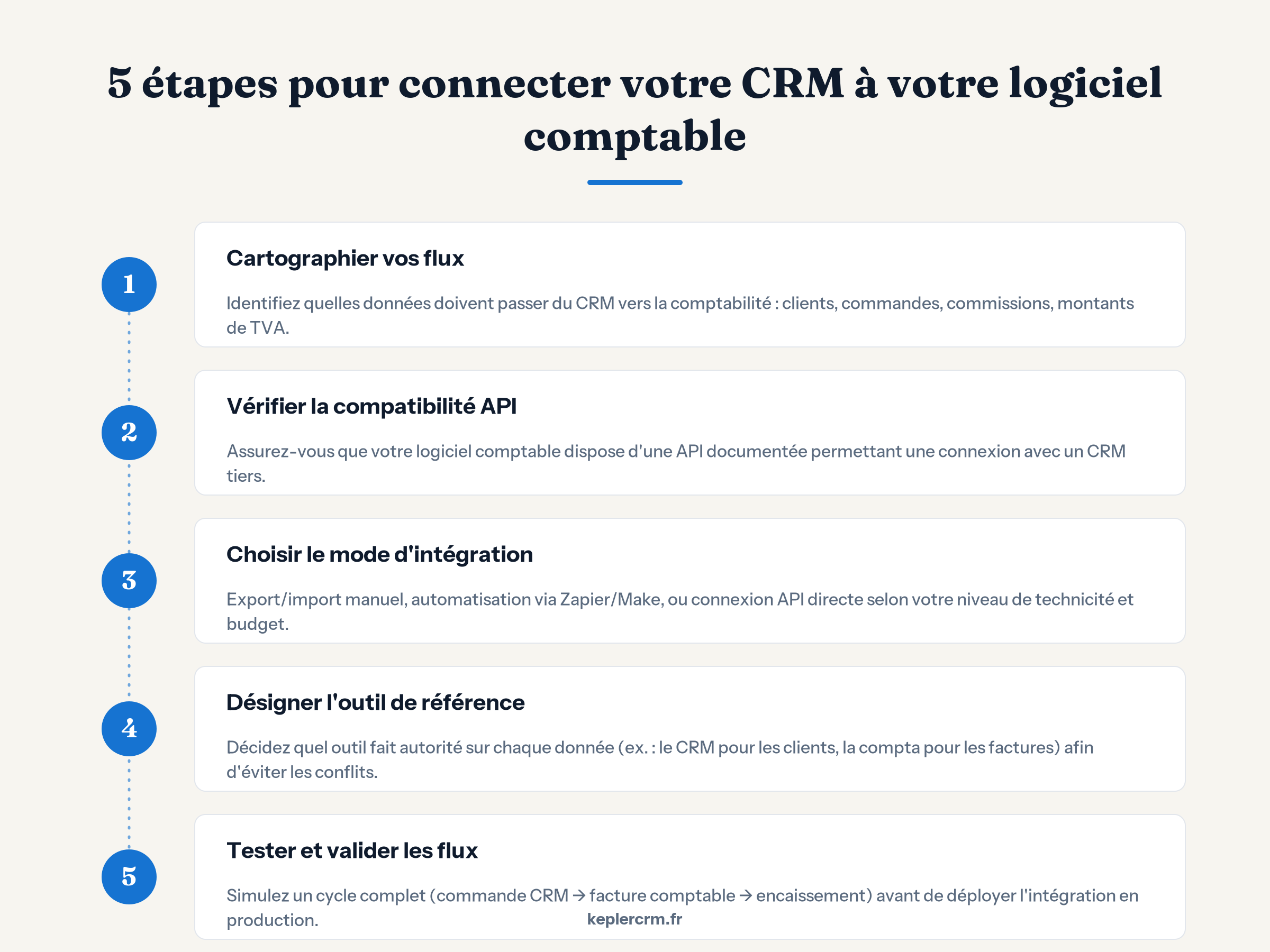
This is where the real productivity gain lies. A field CRM such as KepleR centralises your clients, orders, and commission tracking for your sales rep activity; your accounting software handles invoices and tax returns. Without a bridge between the two, you are manually re-keying data that already exists.
The three possible ways to connect
- Manual export/import: you export a CSV or PDF file from your CRM and import it into the accounting software. Simple but time-consuming, and a source of human error.
- An automation tool (such as Zapier or Make): these platforms create workflows between applications without any bespoke development. A good starting point for testing an integration without heavy technical investment.
- A direct API connection: compatible software exchanges data in real time. An order confirmed in the CRM can automatically trigger an invoice on the accounting side — along with the corresponding accounting entry.
What to check before choosing accounting software
- Does it have a documented and accessible API? This is a sign of a mature tool ready to integrate into an ecosystem.
- Does it offer a native connector with your CRM, or will you need to go through a third party?
- Is it accredited as a DGFiP-approved platform for B2B electronic invoicing?
- Does it handle separation by principal in invoicing and payment tracking?
If you are still weighing up several management tools, our article on the comparison of software for multi-line sales reps will help you clarify priorities based on your profile.
Beware of the all-in-one temptation: some tools promise CRM + accounting in a single subscription. It sounds attractive on paper, but these solutions are rarely optimised for both functions at once. A field CRM designed for sales reps (managing sales routes, shelf audits, principal tracking) and a specialist accounting tool, properly connected, are often more effective than a generalist tool that does everything halfway.
What this means in practice for your day-to-day work as a sales rep
Setting up a well-connected CRM + accounting software pairing transforms the administrative side of your business. Here are the benefits observed in practice:
- No more double entry: client and order information entered in your CRM feeds directly into your invoicing tool, with no re-keying.
- Reliable commission tracking: you know in real time which commissions have been invoiced, which have been received, and which are outstanding — which also makes it easier to calculate and track your commissions.
- Tax returns prepared on an ongoing basis: rather than reconstructing everything at year end, your data is categorised as you go.
- A clear view of your cash flow: you know at any moment what each principal owes you, without digging through Excel spreadsheets.
- An estimated time saving of several hours per month on purely administrative tasks, redirected towards prospecting or field visits.
- Better preparation in the event of a tax audit: documents are traceable and consistent between the CRM and the accounts.
KepleR CRM, available on Web, iPhone, iPad, Android, Mac and Windows, already centralises your clients, sales routes, and commissions. By connecting it to suitable accounting software, you close the loop between field activity and administrative obligations. To go further on structuring your management toolset, see our step-by-step guide to getting started with a sales rep CRM.
Frequently asked questions
Does an independent sales rep need an accountant?
It is not mandatory, but strongly recommended if you operate under the actual income regime (BNC 2035) or through a company. An online firm such as Pennylane, Dougs, or L-Expert-Comptable.com offers support from €39–55/month, which is often far less costly than filing errors.
Can KepleR CRM generate commission invoices?
KepleR CRM is designed for field tracking for sales reps: sales routes, clients, orders, commissions, and product catalogues. For invoicing and accounting proper, it is recommended to use dedicated accounting software connected to KepleR, so that each tool remains excellent in its own domain.
What is the difference between invoicing software and accounting software?
Invoicing software issues invoices and tracks payments. Accounting software goes further: it manages VAT, produces the full tax return, handles bank reconciliation, and prepares the balance sheet. At the start of your activity, invoicing alone may be sufficient; beyond a certain volume or under the actual income regime, full accounting software becomes essential.
Conclusion
Suitable accounting software properly connected to your field CRM means several administrative hours recovered every month — time you can reinvest in visits or prospecting. The choice of accounting software depends on your legal status (micro-enterprise, BNC, company), your volume of activity, and the number of principals you manage. The key is not to let these two worlds — field and administrative — operate in silos. To discover how KepleR CRM structures your commercial activity day to day, take advantage of the free trial and a complimentary one-hour demonstration at keplercrm.fr.