Looking for a free CRM for sales agents is a natural step when you're starting out or trying to reduce fixed costs. Yet between capped freemium versions, generic tools ill-suited to field work, and solutions that ignore the specifics of a multi-line sales agent's role, the risk of wasting more time than you save is very real. Before you choose, here are the concrete points to check.
To get started without a budget, our free Excel tracking spreadsheet is a solid option; for a fully featured tool, discover KepleR, the CRM for multi-line sales agents, with a free trial.
First, check what "free" actually means
The rule is simple: a free CRM is primarily a lead-generation product. Publishers such as HubSpot, Zoho, and Freshsales offer plans with no monthly fee, but with specific constraints on the number of contacts, users, or pipelines. According to comparisons published in 2025–2026 by several specialist outlets, advanced automations, multi-team reporting, and deep third-party integrations are systematically reserved for paid tiers.
For a sales agent managing several principals, a base of 250 or 1,000 contacts may seem sufficient at the start — it quickly becomes a bottleneck as your client portfolio grows. Before adopting any tool, read the terms of use line by line, not just the marketing page.
Check the contact limit before any deployment
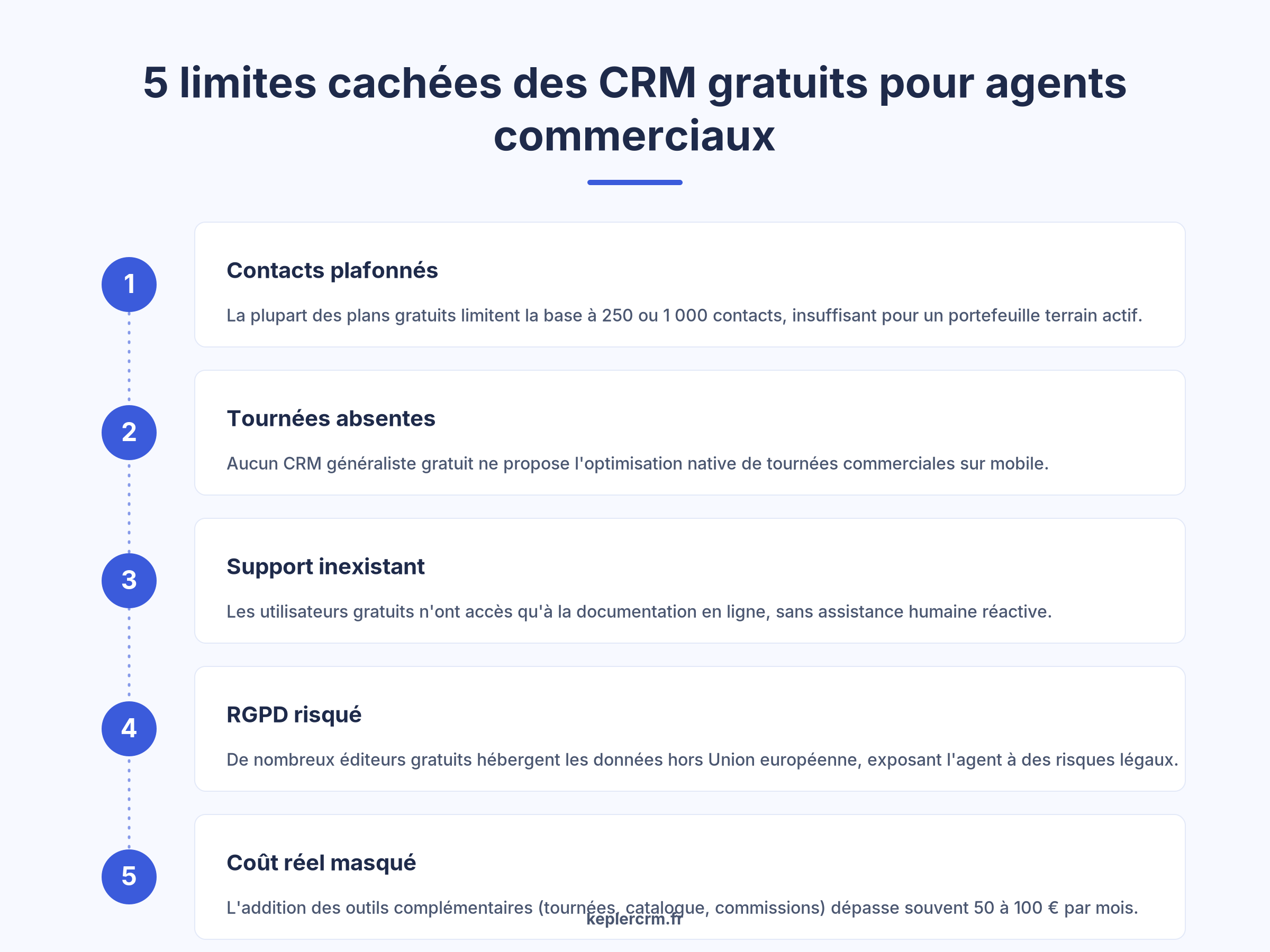
This is the first wall you will hit. An active client portfolio for a multi-line sales agent often runs to several hundred retail banners, points of sale, or buyers. Yet free plans typically cap contacts at between 250 (Capsule CRM) and 1,000 entries.
- Count your current clients + warm prospects + cold prospects.
- Add contacts per principal if you manage several product lines.
- Anticipate your growth over 12 months.
If the total exceeds the free limit, you will be forced to migrate to a paid plan mid-year, with a data migration that costs time. Better to factor that in from the outset.
Reject any tool without a field sales route module
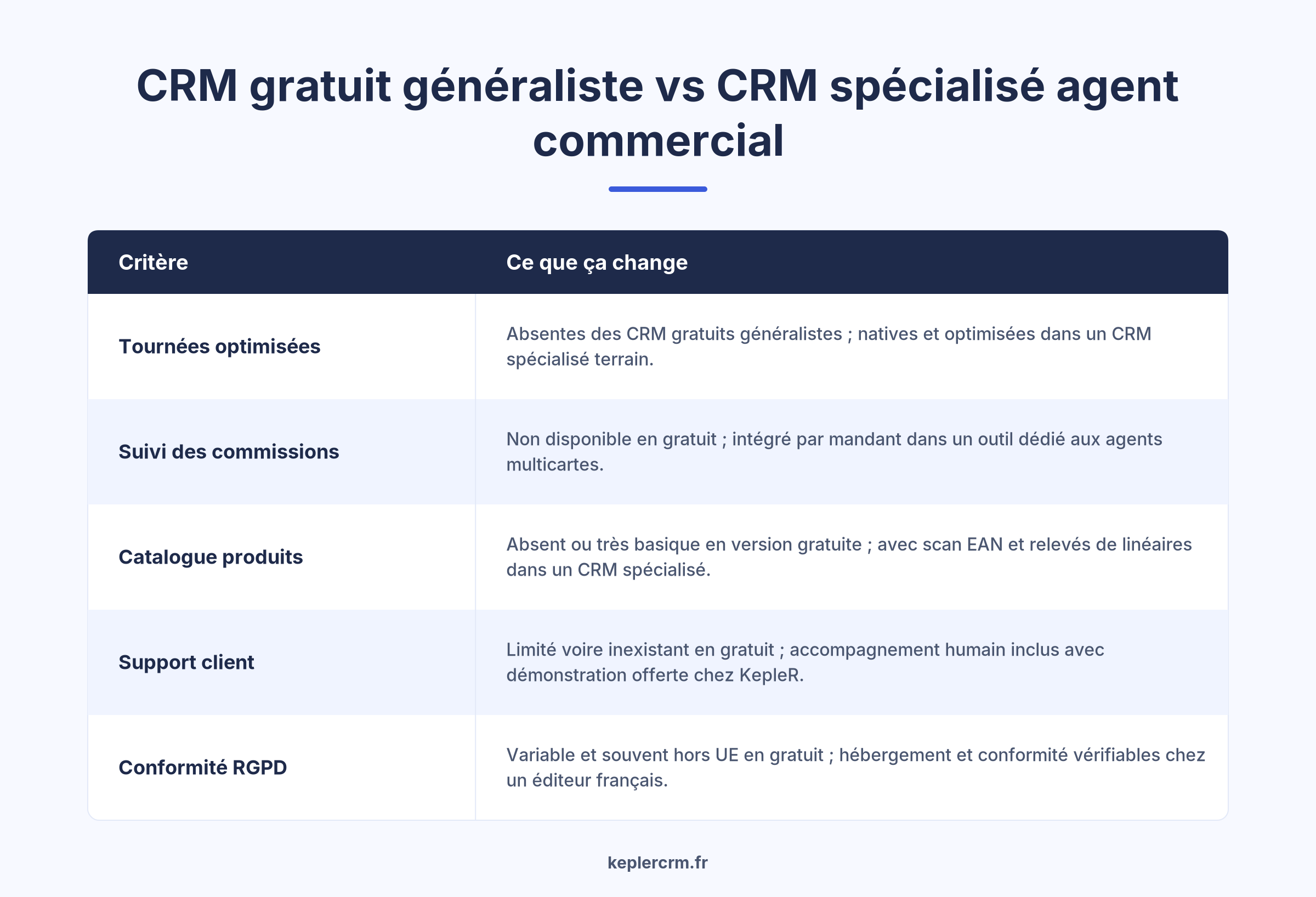
This is the knockout criterion for a sales agent. None of the major generalist CRMs in their free version — not HubSpot, not Zoho, not Bitrix24 — natively offer sales route planning and optimisation. At best, you get a map showing where your contacts are, not a real tool for organising visits.
In practice, this means you continue to plan your journeys by hand or in an external app, juggling between multiple tools. The time lost organising your routes — and the unnecessary kilometres driven — represents a very real, invisible but recurring cost.
A CRM built for field sales agents should be able to reduce your mileage, alert you to clients not visited for too long, and suggest an optimised circuit from your mobile, whether you use an iPhone, Android, or iPad.
Be wary of near-nonexistent customer support
Users of free plans generally receive no human assistance. As several recent comparisons highlight, support for free CRMs is typically very limited: online documentation, forums, video tutorials — but no quick response when you are stuck between two client visits.
For an independent sales agent with no IT department behind them, this point is not trivial. A data synchronisation problem on a Monday morning can cost you an entire day in the field. Before adopting any tool, test the support response time in practice, even on the paid trial version.
Insist on GDPR compliance and hosting in France or Europe
Many free CRMs are published by American companies whose servers are outside the European Union. Yet as soon as you store personal data about your clients (name, address, purchase history), you are subject to GDPR. In the event of a CNIL audit, it is your liability that is at stake, not the publisher's.
- Check server location (ideally France or the EU).
- Read the data sub-processing terms.
- Ensure the publisher signs an accessible DPA (Data Processing Agreement).
A "free" tool that exposes you to a GDPR fine or a client data breach is only free on the surface.
Calculate the real cost, not just the monthly subscription
The advertised price of a free CRM is zero. Its real cost is another matter entirely. Here is what to add up for an honest comparison:
- Setup time: a generic CRM often requires several days of configuration to come close to meeting a field agent's needs.
- Additional subscriptions: a separate route planning tool, a catalogue app, commission tracking software… the bill can quickly exceed €50 to €100 per month once all tools are combined.
- Migration cost: when the free limit is reached, exporting and re-importing your data takes time and can introduce errors.
- Lost revenue: a client not followed up in time due to an inadequate tool means a lost order.
An all-inclusive paid CRM designed for your profession can prove less costly than a stack of poorly suited free tools. For example, KepleR CRM is available at €89 / month excl. VAT, all inclusive, with no hidden modules or onboarding surcharge — worth comparing against the reality of a free tool stack.
Always test on your real use case before committing
Whether the tool is free or paid, no CRM is worth anything without a test under your real working conditions. On mobile, on the road, with your actual contact base, across the territories you cover. A tool that looks perfect in a demo can prove unusable when you are in the car between two appointments.
Before migrating all your data, ask yourself these three practical questions:
- Is the mobile interface usable one-handed, without a slow connection?
- Can I log a visit report in under two minutes?
- Is commission tracking per principal built in, or do I have to maintain a spreadsheet on the side?
If any answer is no, look elsewhere — whatever the advertised price.
Frequently asked questions
Is a free open-source CRM a good alternative for a sales agent?
Open-source solutions such as SuiteCRM or Dolibarr are technically free, but they require server installation, regular technical maintenance, and often the skills of an IT contractor. For an independent sales agent without IT support, the real cost (time + contractor) quickly exceeds that of a ready-to-use paid SaaS solution.
Are free CRMs suitable for agents with several principals?
Rarely. Managing multiple principals involves separate product catalogues, commission tracking per principal, and distinct reports: features absent from the free plans of generalist CRMs. You generally need to move to a paid plan or a specialist tool to cover these needs.
Can KepleR CRM be used on iPhone and Android?
Yes. KepleR CRM is available on all platforms: iPhone, iPad, Android, Mac, Windows, and web browser. The application is designed for daily field use from a smartphone, with an interface built for mobility.
Conclusion
A free CRM for sales agents can be an acceptable starting point if you are beginning with a small client portfolio and limited needs. But for an active multi-line sales agent — with routes to optimise, commissions to track per principal, a catalogue to consult in the field — the limits of free tools make themselves felt quickly. Evaluate the total cost, not just the monthly subscription, and prioritise a tool built for your profession. You can review the features and pricing of KepleR CRM to compare with your current stack, and start a free trial at keplercrm.fr with no commitment.