
Organising sales routes is the lifeblood of any multi-line sales agent: several principals, hundreds of clients, a territory that can stretch for miles, and days that are still only 24 hours long. A poorly planned route means wasted mileage, forgotten key clients, and commissions that simply evaporate. The good news: with a CRM built for the field, planning an entire week of visits takes minutes, not an entire evening. Here is the method, step by step.
Why organising sales routes changes everything for a multi-line sales agent
Time actually spent selling is the scarcest resource for any field-based sales rep. According to the Salesforce State of Sales report, sales reps spend on average only 28% of their time actually selling, with the rest going on travel, preparation, and admin tasks. Every hour saved on the road is another hour spent in front of a client.
For a multi-line sales agent, the stakes are even higher. Unlike a salaried sales representative, the multi-line sales agent develops their business entirely independently: they choose their principals, organise their sales routes, and manage their schedule as they see fit. Nobody plans your days for you, and a rough approach to organisation comes straight out of your commissions.
In practice, a well-structured route allows you to:
- visit 1 to 2 more clients per day for the same effort;
- cut your fuel costs and vehicle wear;
- honour the visit frequency promised to each of your principals;
- stop leaving forgotten clients languishing at the far end of your territory.
The step-by-step method for organising your routes with KepleR CRM
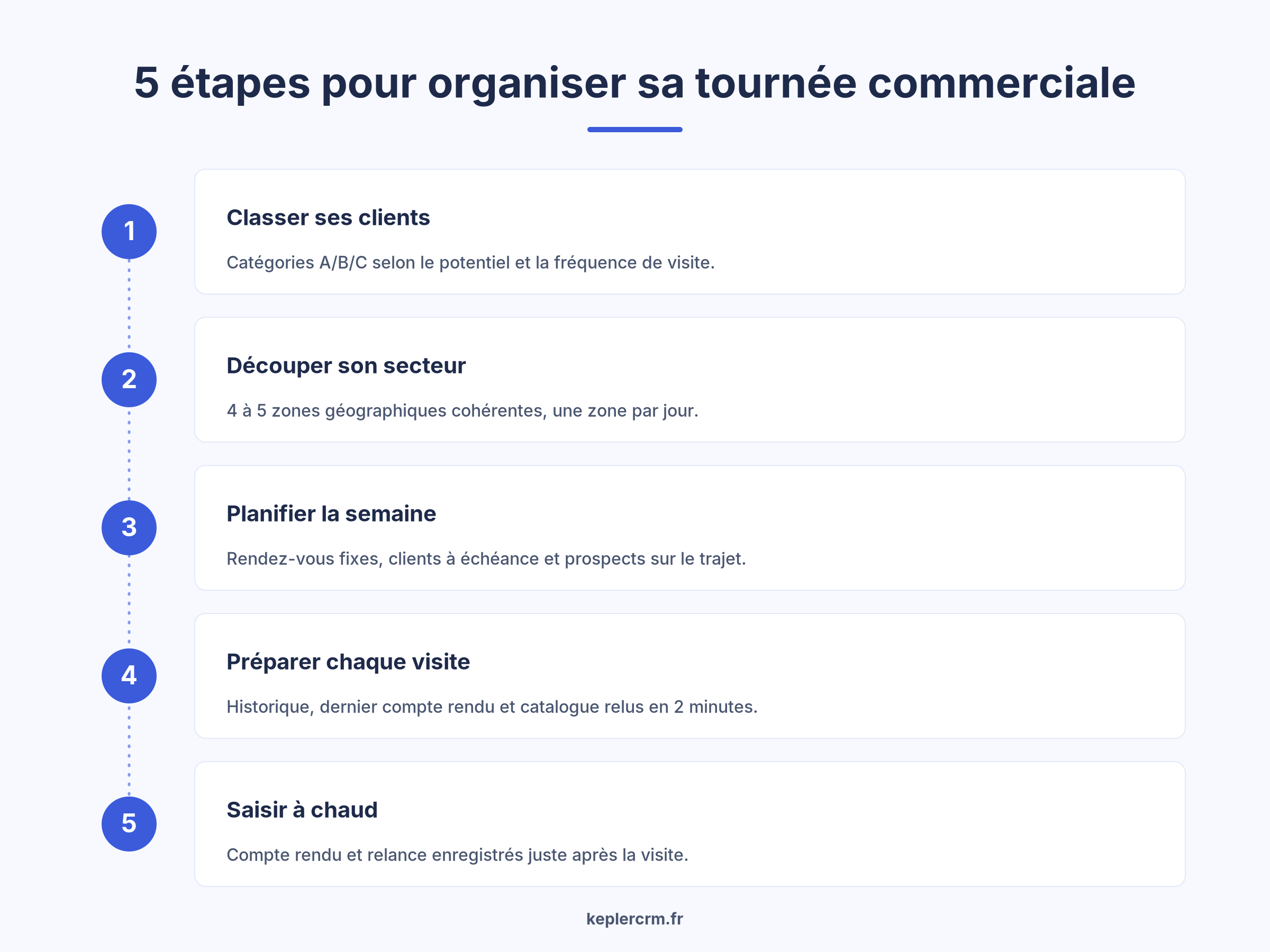
Step 1: rank your clients by potential (A/B/C)
Not all visits are equal: the same time spent with a small client does not deliver the same return as time with a major account. Assign a category to each client in your CRM record: A for key accounts (monthly visit), B for mid-tier accounts (every 6 to 8 weeks), C for smaller accounts (one visit per quarter, topped up by phone).
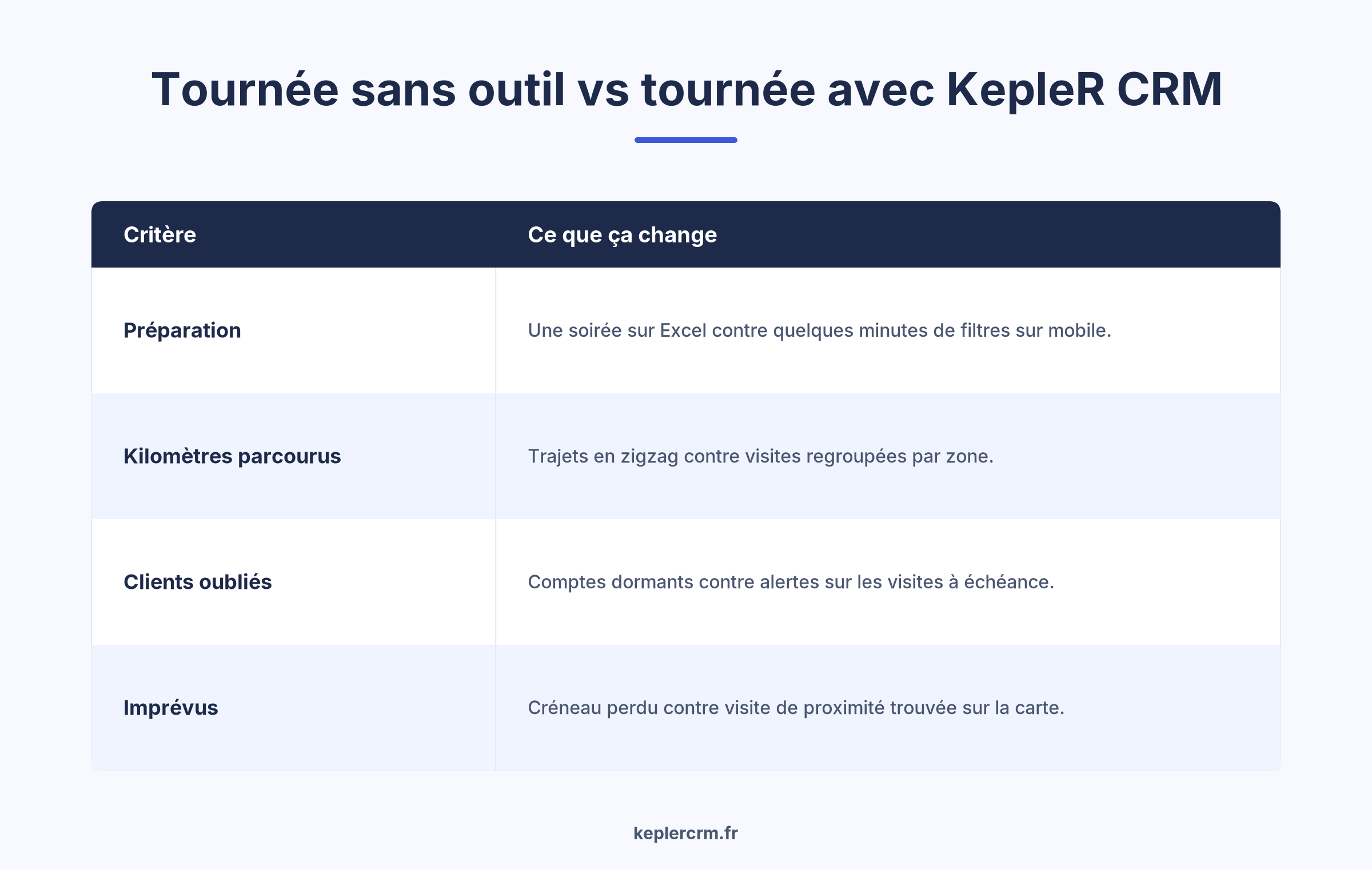
In KepleR CRM, this classification is set once on the client record, with the relevant line or lines attached. You can then filter in two clicks: clients A not visited in the past 30 days in a given area, and your priority list is ready.
Step 2: divide your territory into coherent zones
The principle is simple: never cross your territory twice in the same week. Divide it into 4 or 5 geographical zones and assign one zone per day. The CRM map view displays all your clients with geolocation: natural clusters become immediately obvious, including isolated clients that an Excel spreadsheet would never reveal.
Step 3: build your standard week
On this basis, build your weekly schedule by combining three ingredients:
- the fixed appointments already booked;
- clients in the day's zone who are due a visit;
- 2 or 3 prospects located along the route, so you never neglect prospecting.
Practical example: Monday in the northern zone with 6 visits including 2 A-clients, Tuesday in the eastern zone with 7 visits, and so on. Aim for 5 to 8 visits per day depending on the density of your territory, keeping a 30 to 45-minute buffer for unexpected events.
Step 4: prepare each visit in 2 minutes
The evening before or in the car, open each client record on your mobile: order history, last visit report, outstanding amounts and any disputes, new catalogue items to present. A multi-line sales agent who arrives knowing the last interaction — even with 400 clients and 4 lines — immediately scores points over a competitor who improvises.
Step 5: log the visit report on the spot
A visit report written that same evening is an impoverished one. Dictate or type the essentials straight after the visit, from the car park: order taken, objection raised, follow-up date. This habit feeds your future routes and makes it easier to verify your commissions by principal.
Handling the unexpected: the decisive advantage of a mobile CRM
A client cancels at 2 pm and leaves you a two-hour gap? Without a tool, that half-day is lost. With the CRM map view, you immediately spot nearby clients or prospects and turn the cancellation into an opportunistic visit.
The same logic applies to urgent matters: a complaint or a stock-out flagged by a client in the day's zone appears in your CRM, and you can address it before they even pick up the phone to complain. This kind of responsiveness is what builds long-term client loyalty.
What measurable benefits can you expect?
Take an agent completing 25 visits per week with an average order value of €900 and a commission of 10%. Moving to 30 visits per week through optimised routes, with the same conversion rate, represents approximately €450 in additional commissions per week, or nearly €20,000 over a full year. Add to that the reduction in mileage: on 40,000 km per year, a 10% saving represents several hundred euros in fuel.
Beyond the figures, you gain peace of mind: no more A-client forgotten for three months, no more evenings spent preparing the next day, and a clean history line by line to justify your commissions to each principal. For full details on route-planning features and pricing, visit the KepleR CRM pricing and features page.
Frequently asked questions
How many visits should I plan per day on a sales route?
The usual range is between 5 and 8 visits per day, depending on the density of your territory and the average length of an appointment. Always keep a 30 to 45-minute buffer to absorb delays and unexpected events.
How do I manage several lines in the same route?
Link each client to the relevant lines in your CRM, then plan by geographical zone rather than by principal. A single appointment can thus cover two or three lines, increasing the revenue generated per visit.
Is a simple sat-nav not enough to organise sales routes?
A sat-nav optimises a journey between addresses, but it cannot tell you which clients are priority or how long it has been since they were last visited. It is the combination of the map, client history, and visit frequency that makes the difference — and that is precisely the role of a field CRM.
Conclusion
Organising sales routes is not rocket science: rank your clients, divide your territory, prepare your visits, and adjust in real time. What makes all the difference is having that information in one place, in your pocket, rather than scattered across a diary, a spreadsheet, and your memory. KepleR CRM was designed exactly for this: try it free on your next week of visits and see the difference for yourself.
To choose the right tool for your business, also see our comparison of software for multi-line sales agents (updated August 2026).